Published on Friday 16th October 2026

Every piece of text you see on a screen is stored and processed as numbers. Character encoding is the set of rules that allows software to turn those numbers into readable text. When systems follow the same rules, nobody notices. When they disagree, the results are familiar: “£250” on an invoice, a question mark replacing an accented letter in a client’s surname, or a CSV export that Excel turns into nonsense. Understanding how we got here makes these problems much easier to diagnose.
Where It Started: ASCII
The American Standard Code for Information Interchange, ASCII, was first published in 1963. It used seven bits, allowing 128 possible codes. The familiar version of ASCII contains 95 printable characters, including the space, alongside 33 control codes. Some of those controls remain part of everyday computing: carriage return and line feed are used in the different line-ending conventions associated with Windows, Linux and macOS. ASCII was designed around American English and had no pound sign. The British variant, BS 4730, put £ in the position occupied by #, creating an early opportunity for confusion when text moved between systems.
The Code Page Era
As eight-bit bytes became standard, another 128 values became available. Different character sets used those values for different purposes. The original IBM PC’s code page 437 included accented letters and box-drawing characters. ISO 8859-1, also called Latin-1, covered many Western European languages and placed £ at decimal value 163. Windows-1252 closely followed Latin-1 but used part of its range for additional printable characters, including curly quotation marks and, later, the euro symbol. IBM mainframes used another family of encodings, EBCDIC. Reading a file correctly depended on knowing its encoding, but plain text files rarely identified it. Continue reading →
Published on Friday 25th September 2026

Paying for an AI subscription does not automatically keep your conversations out of model training. Personal plans such as ChatGPT Plus and Claude Pro still have training controls that users need to understand. For businesses using AI to draft emails, summarise documents or analyse information, the type of account and its privacy settings matter. Here is what to check across ChatGPT, Claude, Google Gemini and Microsoft Copilot.
Training is not the same as answering your question
An AI service has to process what you give it in order to answer. Using that information later to train or improve a model is a separate activity. Saving your chat history and remembering your preferences are separate again. A training opt-out therefore does not mean your information is never processed, stored or reviewed. Equally, asking an assistant to summarise a document does not in itself mean the provider is training on that document.
ChatGPT, including Plus and Pro
OpenAI enables training data sharing by default for personal Free, Plus and Pro accounts. You can switch it off without losing your chat history by going to Settings > Data controls > Improve the model for everyone. The setting follows your signed-in account across devices. Rating a response with a thumbs-up or thumbs-down can still make that conversation available for training. Temporary Chats are excluded from model improvement, although OpenAI may keep them for up to 30 days for safety purposes. ChatGPT Business and ChatGPT Enterprise are not used for training by default. A personal Plus subscription does not become a Business workspace just because you use it for work. Continue reading →
Published on Monday 21st September 2026
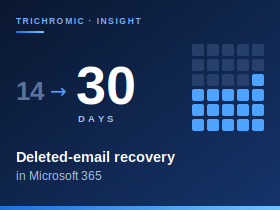
For most small businesses, email holds far more than correspondence: customer requests, quotations, approvals and supplier conversations that staff need to refer back to. When someone permanently deletes the wrong message, Exchange Online gives you a window to recover it. By default that window is 14 days, but administrators can extend it to 30.
Deleted doesn’t mean gone
Deleting a message normally just moves it to Deleted Items, where it stays until it is removed by the user or an automatic policy. The recovery countdown starts only when a message moves into a hidden area called Recoverable Items. That happens when a user empties Deleted Items, deletes a message from it, or uses Shift+Delete. Messages then stay in Recoverable Items for 14 days by default. Because the countdown starts at that point rather than when the message was received, years-old email removed yesterday is still recoverable today.
During that period, users can retrieve messages themselves using Recover Deleted Items in Outlook or Outlook on the web. If a user also purges a message from there, Single Item Recovery keeps a copy that an administrator can restore within the same window. Single Item Recovery is enabled by default for new Exchange Online mailboxes, but it can be switched off, so it is worth confirming it is on.
Extending the window to 30 days
Deletions are not always noticed straight away. Someone tidying their mailbox may remove something important and only realise weeks later, when a customer or supplier refers back to it. Extending the retention period from 14 to 30 days more than doubles the time available to spot the problem and recover the message, at no extra cost. Continue reading →
Published on Monday 21st September 2026
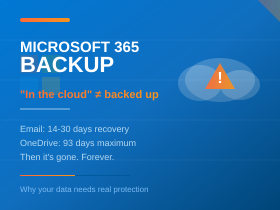
Microsoft 365 includes useful protection for business email and files. Deleted messages can often be recovered, and Microsoft’s infrastructure is built to keep services available. Recovery has limits, though. What you can get back depends on what happened, how quickly it is noticed, and what protection was configured beforehand.
What Microsoft already protects
Microsoft keeps multiple copies of Exchange Online mailbox databases across its data centres to protect against hardware and site failures. This resilience keeps the service running, but it is not a historical backup. The standard service offers no way to roll a mailbox back to a chosen date.
How long deleted email can be recovered
Emails in Deleted Items can be moved back until the folder is emptied, either by the user or by an automatic policy. Once emptied, or if messages were removed with Shift+Delete, they normally stay in Recoverable Items for 14 days, and an administrator can extend this to 30. Single Item Recovery is enabled by default for new mailboxes, so an administrator can usually still retrieve messages a user has purged, within the same window. That window starts when a message enters Recoverable Items, not when it was received. Five years of email deleted yesterday may therefore still be recoverable today, but not next month.
Deleting a user account normally leaves 30 days to restore the mailbox. Removing an Exchange Online licence usually allows a similar 30-day period to reassign it. After that, the data is deleted, and some explicit permanent-deletion actions can remove recovery options sooner. Continue reading →
Published on Wednesday 16th September 2026
A plain-English guide for UK business owners, managers and staff
Updated 16 September 2026
If your team has recently struggled to connect to its remote desktop, September’s Windows updates could be responsible. Microsoft has confirmed that its security updates released on 8 September can make Remote Desktop Services unstable in some environments. It released corrective updates on 14 September 2026. Microsoft’s issue notice
What has gone wrong?
Remote Desktop Services, often called RDS or Terminal Server, lets staff use desktops and applications running on a shared server in the office or a data centre. Many people simply know it as “logging into the server”. Because everyone shares the same system, a fault can cut off several people at once.
Microsoft describes connection and sign-in failures, servers hanging at “Please wait for the Remote Desktop Configuration”, and related management tools freezing. Citrix also reports new connections stuck at “Connecting…” and users unable to log off, often several hours after a restart. Citrix’s advisory The fault can affect Windows Server 2012 (with ESU) through 2025 and some Windows desktop versions, but not every system running these versions will experience it.
Has Microsoft fixed it?
Yes. Microsoft issued out-of-band updates on 14 September, outside its normal monthly schedule. They resolve the RDS issue and keep the protections from earlier security updates. Some of these updates, including the Server 2025 fix, are published through the Microsoft Update Catalog. Businesses therefore shouldn’t assume their usual automatic updates have already installed them. IT teams that applied Microsoft’s temporary Group Policy mitigation don’t need to remove it first.
Uninstalling the September update is not a sensible routine fix. It restores remote desktop access, but it also removes security fixes, including fixes for critical Remote Desktop vulnerabilities.
What should businesses do?
Staff should report the exact message they see and when it happened. They should save work regularly and follow IT’s instructions about reconnecting. They should also resist moving files to personal email or cloud storage to work around the problem. Continue reading →
Published on Tuesday 8th September 2026
For many UK SMEs, artificial intelligence still feels like a future project—something that requires budget approval, planning, or a new licence. But Microsoft 365 customers may already have AI capabilities available within familiar applications, without purchasing a separate Copilot subscription. This means AI may already be interacting with company information before leadership has formally approved an AI rollout.
Copilot Chat in Outlook can use a user’s emails and calendar to answer questions and help organise their work. Availability depends on licensing, application version, and administrative settings, but businesses should no longer assume that declining to purchase Copilot prevents its use.
What Is Included, and What Requires a Paid Licence?
Microsoft’s naming is changing. Microsoft 365 Copilot is now described in its documentation as Microsoft Copilot, and Microsoft 365 Copilot Chat as Microsoft Copilot Chat. Customers may still encounter the previous names in applications and licensing screens during the transition. Microsoft’s naming notice
A common misconception is that included Copilot Chat cannot access company data, while paid Copilot can. The actual boundary depends on the application, licence, configuration, and how information is supplied. Continue reading →
Published on Monday 24th August 2026

Artificial intelligence is usually demonstrated by asking it to write an email, summarise a document or generate an image. Those uses are real enough, but they say very little about what AI can do in the hands of someone who already understands the problem in front of them.
We had a more practical example recently. Two Windows Server 2016 Remote Desktop Services (RDS) hosts failed to boot following a routine update cycle. One displayed a BAD_SYSTEM_CONFIG_INFO stop error; both ultimately halted at Windows Boot Manager reporting 0xc0000225 – A required device isn't connected or can't be accessed. These were production systems, so reinstalling Windows was a last resort rather than a first move. Both were eventually recovered without a rebuild, and the update that appeared to have caused the problem turned out not to be the whole story.
Before You Copy Any of This
Windows servicing is stateful, and two machines showing the same stop code can have entirely different underlying faults. Nothing below should be treated as a set of commands to paste into a broken server.
Take a backup or confirm you have a working recovery route before touching a production system. In a virtual environment a checkpoint is a useful short-term safety net while troubleshooting, but a Hyper-V checkpoint is not a backup and should never be relied on as one. Most importantly, do not remove an update package because a package identity appears in an article — always identify what is actually present on your own system.
First, Establish What Windows Is Actually Doing
Error 0xc0000225 normally sends administrators straight towards the BCD, the EFI System Partition or missing boot files, and that would have been a reasonable first instinct. The more useful clue was that both servers had just been through an update cycle, which raised a different possibility: that Windows servicing had been interrupted part-way through committing an update during startup. Continue reading →
Published on Friday 21st August 2026
Britain’s cyber security authority has, for the first time, told the public to choose passkeys over passwords wherever they can. Here’s what that actually means for the businesses still running on “Summer2025!” and a sticky note.
At CYBERUK 2026 in Glasgow in April, the National Cyber Security Centre — the part of GCHQ that issues the UK’s official cyber guidance — formally recommended that passkeys should be the default way of logging in to online services where they are available. It’s a striking departure from decades of advice telling us to pick longer, stranger, more memorable strings of characters, and it followed a similar move by the UK government to roll passkeys out across GOV.UK services as an alternative to password-and-security-code sign-in, a change expected to save several million pounds a year. GOV.UK One Login began offering passkeys on 28 July 2026.
The NCSC still recommends a good password manager paired with two-step verification for the many services that have not yet added passkey support. But where the option exists, the message is clear: take it.
For small business owners, that translates into something simple: if your suppliers, banks and cloud platforms support passkeys — and many of the big ones now do — it is time to start switching over.
This week’s passkey checklist
If you read no further, do these five things:
- Turn on passkeys for your Microsoft 365 or Google Workspace admin accounts first, then your standard user accounts.
- Make sure you have at least two independent ways of regaining access to each critical account — for example, a synced passkey plus a separate hardware security key or another registered passkey.
- Set up a working fallback for every account — recovery codes where offered, a second registered passkey where appropriate, and make sure you understand the recovery options for the credential manager you use.
- Review the registered passkeys and sign-in methods on your critical accounts and remove anything you don’t recognise.
- Make sure your IT provider has documented the recovery process before someone loses a phone — not after.
Continue reading →
Published on Friday 21st August 2026
BERKELEY, CA — Before it became the backbone of modern internet infrastructure, before major institutions staked their data architectures on it, and before the elephant logo became a familiar sight in server rooms worldwide, PostgreSQL endured more than two decades of reinvention, academic intrigue, and near-extinction. Its story, stretching back to 1973, is less a corporate origin myth than a picaresque tale of a piece of software that simply would not stay buried.
Act I: INGRES and the Berkeley Crucible (1973–1985)
The story does not begin with PostgreSQL. It begins in an office at the University of California, Berkeley, where a young professor named Michael Stonebraker and his colleague Eugene Wong launched a project in 1973 called INGRES (Interactive Graphics and Retrieval System). At the time, the relational model was barely three years old, a theoretical curiosity proposed by IBM researcher Edgar Codd. Stonebraker and Wong decided to build a working relational database from scratch.
For over a decade, INGRES grew into one of the most important database systems in the world, rivalling IBM’s own efforts. But by the mid-1980s, the focus of database research was shifting. Stonebraker and his team wanted to tackle new technical frontiers: extending database support beyond traditional business data to handle complex objects, geographical data, CAD/CAM systems, and documents. The relational model had been proven; now, it needed to evolve. Continue reading →
Published on Monday 17th August 2026
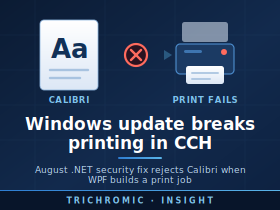
Updated: 18 August 2026 (before you get too excited, we have now confirmed this solution does NOT fix CCH).
A Microsoft .NET security update released on 11 August 2026 is causing printing failures in some Windows 11 and Windows Server business applications that use Windows Presentation Foundation (WPF) and the XPS printing system.
We have encountered the problem with Wolters Kluwer CCH, but the underlying issue is not specific to CCH. Reports from other organisations show the same problem affecting .NET Framework applications, Crystal Reports-based applications and other software that uses WPF font subsetting when printing. Microsoft is currently investigating the regression.
What Are the Symptoms?
Affected applications may suddenly stop printing after the August 2026 Windows/.NET updates have been installed.
An error may refer to a Windows font such as Calibri and report that the font:
does not conform to the expected file format specification
The fonts themselves are not necessarily corrupt. Testing has shown that Windows can still load and display them normally. The failure occurs specifically when WPF attempts to create a subset of the font for XPS or printing.
Fonts reported as affected include:
- Calibri
- Cambria
- Constantia
- Corbel
Other fonts, including Arial, Segoe UI and Times New Roman, have continued to work in testing. Some older third-party fonts may also be affected.
Which Windows Updates Are Involved?
The problem was introduced by the August 2026 .NET security updates. The exact KB number depends on the version of Windows. Continue reading →




