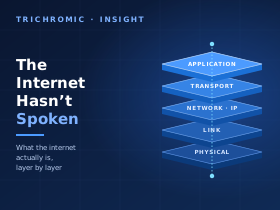
This week, as the PHP2Shell vulnerabilities made the news, one widely shared headline read: “Websites shut down globally after AI finds cybersecurity flaw affecting 70% of the internet”. Other coverage repeated versions of the same line: PHP (which today stands for “PHP: Hypertext Preprocessor”, and originally for “Personal Home Page”) “runs” or “powers” 70% of the Internet.
The flaws were serious. They are tracked as CVE-2026-109618 and CVE-2026-109619 (CVE stands for Common Vulnerabilities and Exposures, the public catalogue of security flaws), and they are fixed in PHP 8.5.12, 8.4.27, 8.3.36 and 8.2.35, or any later release in those branches. If you run a PHP website, read our earlier article on PHP2Shell and get the server patched. But the headline is wrong, and not in a nit-picking way. It is a category error, a bit like saying that 70% of the road network is made of Ford Fiestas.
The same goes for that other favourite, “the Internet has spoken”, used whenever a few thousand people agree about something on social media. The Internet hasn’t spoken. It can’t. It moves packets.
I have been working in electronic engineering, IT support and cloud for more than 30 years. When I started installing Cisco routers, the machines on the LAN (local area network) side had real, public, globally routable IP (Internet Protocol) addresses, because address translation was not yet part of everyday networking. That background makes these phrases grate. This is not a rant, though. It is an explanation, written for younger engineers, students, apprentices and developers who want to understand what actually sits underneath a web page, and why the difference between “the Internet”, “the Web” and “a website” matters.
It is a long one. Put the kettle on.
The short version
- The Internet is a global network of independently run IP networks that agree to exchange traffic. Its job is to carry packets from one address to another. That is all.
- The Web is one application that runs over the Internet, using HTTP (Hypertext Transfer Protocol). Email, DNS (the Domain Name System), voice calls, online games, VPNs (virtual private networks), SSH (Secure Shell) sessions and software updates are other traffic that uses the Internet without being “the Web”.
- PHP is a programming language. On a web server, it is one of several ways to generate the pages the Web delivers. It is not a network protocol, and the routers that carry Internet traffic do not need to know it exists.
- The “70%” figure comes from W3Techs, which reports that PHP is used by 69.3% of websites whose server-side programming language it can identify (figure as at 24 October 2026). That is a statement about a sample of websites, not about the Internet.
The rest of this article explains why, layer by layer.
What the Internet actually is
The word gives the game away. “Internet” comes from internetworking: joining separate networks together. There is no single Internet company, no central computer and no master switch. There are tens of thousands of separately run networks. For routing purposes, the Internet sees them as Autonomous Systems (ASes): networks, or groups of networks, under one administration that present a single routing policy to the outside world, each identified by an AS number. Broadband providers, mobile networks, universities, cloud providers and content delivery networks each operate one or more. The global IPv4 (IP version 4) routing table currently shows roughly 80,000 autonomous systems announcing about 1.09 million IPv4 prefixes. The separate IPv6 (IP version 6) table holds around 260,000 IPv6 prefixes. The exact numbers vary depending on where you observe from.
Those networks connect to each other in two broad ways:
- Transit: one network pays another to carry its traffic to and from the rest of the Internet.
- Peering: two networks agree to exchange traffic directly between their own networks and their customers, usually without paying each other for it. Peering happens either over a private cable between two networks, or at an Internet Exchange Point (IXP) such as LINX (the London Internet Exchange), where hundreds of networks connect to a shared switching fabric.
The protocol that ties all of this together is BGP, the Border Gateway Protocol. Each network uses BGP to tell its neighbours which blocks of IP addresses it can reach, and through which path of AS numbers. BGP is not about finding the fastest route. It is a policy protocol: networks choose paths based on business relationships, preferences and path length. When you hear about a big outage caused by “a routing problem”, it is very often BGP: someone announced the wrong thing, or withdrew the right thing.
The narrow waist
The reason all those different networks can work together is that they agree on one thing in the middle: the Internet Protocol (IP). Below IP, a network can be built from almost anything: copper, fibre, Wi-Fi, fourth-generation (4G) and fifth-generation (5G) mobile radio, satellite links. Above IP, you can run almost any application. Engineers describe this as an hourglass, with IP as the narrow waist:
   Email   Web   DNS   VoIP   Games   SSH   VPN   Streaming   ...
      \      \     |     |      |      |     /       /
            SMTP, HTTP, DNS, SIP/RTP, SSH, ...      (applications)
                 TCP     UDP (with QUIC on top)     (transport)
                       \     /
                          IP                        (the narrow waist)
                        /  |  \
        Ethernet   Wi-Fi   PPP   GPON   4G/5G   Satellite   (links)
        copper, fibre, radio, DSL lines, ...                (physical)
In case some of those are new to you: VoIP is Voice over IP, the technology behind most phone systems now. SMTP (Simple Mail Transfer Protocol) carries email between servers. Many VoIP systems use SIP (Session Initiation Protocol) to set up calls and RTP (Real-time Transport Protocol) to carry the audio. TCP (Transmission Control Protocol) and UDP (User Datagram Protocol) are the two classic transport protocols. QUIC was originally short for “Quick UDP Internet Connections”, though the standard now treats it simply as a name. PPP is the Point-to-Point Protocol. GPON (Gigabit Passive Optical Network) is the technology behind most fibre-to-the-premises broadband, and DSL (Digital Subscriber Line) carries broadband over telephone copper. We will meet most of them again.
A core router’s job is to read the destination address in each IP packet, look it up in its forwarding table and send the packet out of the right interface towards the next router. A large core router can do this billions of times a second. To forward a packet, it does not need to know whether the packet carries part of a web page, an email, a voice call or a PHP error message.
That leads to an important design idea called the end-to-end principle. Functions that need knowledge of the application, such as guaranteed delivery, putting data back in order or encryption, are best done at the endpoints (your computer and the server), not inside the network. The principle does not mean routers are dumb, since modern routers run complex software and keep plenty of state. It does mean the network core does not need to understand your application for your application to work. That is precisely why new applications like the Web could appear without anyone redesigning the Internet.
The Internet came first. The Web came much later.
It helps to see the timeline. The Internet was running for years before the Web existed, and PHP arrived later still.
| Date | Milestone |
|---|---|
| 29 October 1969 | The first ARPANET (Advanced Research Projects Agency Network) host-to-host message goes from UCLA (the University of California, Los Angeles) to SRI (then the Stanford Research Institute). The intended word was “LOGIN”; the system crashed after “LO”. ARPANET was a precursor to the Internet, not the Internet itself. |
| 1 January 1983 | “Flag day”: ARPANET switches from its old NCP (Network Control Program) protocol to TCP/IP, under a plan set out in RFC 801. (RFCs, “Requests for Comments”, are the numbered documents in which Internet standards are published.) This is often treated as the Internet’s practical birthday. |
| November 1983 | The Domain Name System is first specified (RFCs 882 and 883), later replaced by RFCs 1034 and 1035 in 1987. |
| October 1984 | The OSI (Open Systems Interconnection) reference model is published as ISO 7498, by the International Organization for Standardization (ISO). |
| March 1989 | Tim Berners-Lee writes his proposal for what became the World Wide Web, at CERN, the European particle physics laboratory near Geneva (the name comes from the French Conseil Européen pour la Recherche Nucléaire). |
| June 1989 | The first version of BGP is published (RFC 1105). |
| End of 1990 | The first web server, browser and website are running at CERN. The Web is announced to the wider Internet in August 1991. |
| September 1993 | CIDR (Classless Inter-Domain Routing, RFC 1519) replaces classful addressing, to slow both address waste and routing-table growth. |
| March 1994 / May 1994 | Private address ranges (RFC 1597, later RFC 1918) and NAT (Network Address Translation, RFC 1631) are documented. |
| 30 April 1995 | The NSFNET (National Science Foundation Network) backbone is retired, marking the shift to commercially run backbones. |
| 1995 | Rasmus Lerdorf releases the first public version of what became PHP. |
| 3 February 2011 | IANA (the Internet Assigned Numbers Authority) hands out its last ordinary blocks of IPv4 addresses. |
| 25 November 2019 | RIPE NCC (Réseaux IP Européens Network Coordination Centre), the regional Internet registry for Europe including the UK, makes its final IPv4 allocation from its available pool. |
So, by the time PHP appeared, the Internet had been running TCP/IP for over a decade. Saying PHP “runs the Internet” is like saying the paint runs the car.
The models: OSI’s seven layers and TCP/IP’s four
Networking is easier to reason about if you split it into layers. Each layer does one job, uses the services of the layer below and offers a service to the layer above. There are two models you will meet.
The OSI model (ISO 7498, 1984) has seven layers. The full OSI protocol suite it was designed for never really took off, but the model itself became the standard vocabulary of the industry. When an engineer says “that’s a layer 2 problem”, they are using OSI numbering.
The TCP/IP model, described in RFC 1122 (1989), is what the Internet actually implements. It has four layers and folds OSI’s top three into a single application layer, and OSI’s bottom two into a single link layer.
| OSI layer | What it does | Unit of data | Examples | Typical kit | TCP/IP layer |
|---|---|---|---|---|---|
| 7 Application | The protocols applications use to talk to each other | Data / messages | HTTP, DNS, SMTP, IMAP (Internet Message Access Protocol), SSH, SIP | Browsers, web servers, mail servers | Application |
| 6 Presentation | How data is represented: character encoding, compression, encryption | Data | UTF-8 (Unicode Transformation Format, 8-bit), JPEG (Joint Photographic Experts Group) images, gzip compression, aspects of TLS (Transport Layer Security) | (Software libraries) | |
| 5 Session | Setting up, managing and resuming conversations | Data | TLS session resumption, RPC (remote procedure call) sessions | (Software libraries) | |
| 4 Transport | End-to-end delivery between programs, identified by port numbers | Segment (TCP) / datagram (UDP) | TCP, UDP, QUIC (over UDP) | Firewalls, load balancers | Transport |
| 3 Network | Addressing and routing packets between networks | Packet | IPv4, IPv6, ICMP (Internet Control Message Protocol) | Routers, layer 3 switches | Internet |
| 2 Data link | Delivering frames across one local link. Ethernet and Wi-Fi identify devices by MAC (Media Access Control) address | Frame | Ethernet, Wi-Fi (IEEE 802.11; IEEE is the Institute of Electrical and Electronics Engineers), PPP | Switches, wireless access points | Link |
| 1 Physical | Turning bits into voltages, light or radio and back again | Bits / symbols | Copper, fibre, radio, DSL line coding | Cables, transceivers, repeaters |
If you need a way to remember the seven layers from the bottom up, the classic is “Please Do Not Throw Sausage Pizza Away”. If you have read our article on character encoding, that whole story lives at layer 6.
Where the model gets fuzzy
The OSI model is a reference model, not a law of nature, and real protocols do not always sit neatly on one layer. Knowing where it blurs is a sign that you understand it properly:
- ARP (Address Resolution Protocol), which finds the MAC address for an IPv4 address on a local network, uses layer 2 frames directly but exists purely to serve layer 3. (IPv6 replaces it with Neighbour Discovery, which runs over ICMPv6, the IPv6 version of ICMP.)
- TLS (Transport Layer Security), which provides the padlock in your browser, does encryption (a presentation job) and session management (a session job), but is usually provided by a software library inside the application and, for HTTP/1.1 and HTTP/2, runs on top of TCP. Ask three engineers which layer it is and you will get three answers.
- QUIC, used by HTTP/3, runs over UDP but does its own reliability, ordering and congestion control (transport jobs), with TLS 1.3 built into its handshake. It deliberately spans several OSI layers.
- BGP controls layer 3 routing, but it is itself an application that runs over TCP port 179.
- MPLS (Multiprotocol Label Switching), which forwards traffic using short labels rather than IP addresses, is often called “layer 2.5” because it sits between Ethernet and IP. That is informal shorthand, not an eighth OSI layer.
- NAT (Network Address Translation), which we will come to, translates IP addresses (layer 3). Its common address-sharing form also rewrites TCP and UDP port numbers (layer 4), deliberately breaking the model’s separation.
And yes, you will hear people talk about “layer 8”. That is the user. Most faults are still there.
Following a web request through the layers
Let’s make this concrete. You are at home in the UK. You type https://www.trichromic.co.uk into your browser and press Enter. Here is what happens, simplified but accurate. The addresses used are examples.
Step 0: Your device joins the network (DHCP)
When your laptop joined the Wi-Fi, it had no IP address. It broadcast a DHCP (Dynamic Host Configuration Protocol) request and your home router, which is really a router, switch, wireless access point, firewall, DHCP server and DNS forwarder in one plastic box, handed back four things:
- A private IPv4 address, say
192.168.1.42 - A subnet mask, typically
255.255.255.0(a/24), which tells your laptop which addresses are local - A default gateway, say
192.168.1.1, which is the router’s own LAN address - One or more DNS resolver addresses
Many UK providers also hand out IPv6 at this point. We will follow IPv4 here because it shows ARP and NAT, and come back to IPv6 later.
Step 1: Name to number (DNS, layer 7)
Routers do not understand names. IP packets need a numeric address, so the browser first needs the IP address for www.trichromic.co.uk. It checks its own cache, then asks the operating system, which checks the hosts file and its own cache. On a cold cache, the operating system sends a DNS query to the resolver it was given in step 0. For this example, let’s say that is a public resolver at 1.1.1.1. (Strictly, step 2 below has to happen first, because the query itself needs to get out of your network. Networking is never quite as tidy as a numbered list.)
That resolver does the legwork. If it does not already have the answer cached, it asks one of the root name servers “who handles .uk?”, then asks Nominet’s .uk servers “who handles trichromic.co.uk?”, then asks that domain’s authoritative name server for the address of www. The answer comes back, say 203.0.113.50, with a time-to-live that says how long it may be cached.
Notice that DNS is not “the Web”. It is a separate application layer protocol, usually over UDP port 53, that almost every Internet application depends on. That is where the old joke comes from: “It’s not DNS. There’s no way it’s DNS. It was DNS.”
Step 2: Is it local? (subnet maths and ARP, layers 3 and 2)
Before sending that DNS query, or anything else, your laptop compares the destination address with its own, using the subnet mask:
192.168.1.42  AND 255.255.255.0  =  192.168.1.0   (my network)
1.1.1.1       AND 255.255.255.0  =  1.1.1.0       (not my network)
They don’t match, so the destination is not on the laptop’s directly connected network. The laptop checks its routing table. Here there is no more specific route (a VPN, for example, could add one), so the packet goes to the default gateway. To put a frame on the local Ethernet or Wi-Fi, though, your laptop needs the gateway’s MAC address, its layer 2 hardware address. If it doesn’t have it cached, it broadcasts an ARP request: “Who has 192.168.1.1? Tell 192.168.1.42.” The router replies with its MAC address.
This is the point that trips up many juniors, so it is worth saying clearly:
- The destination IP address is the final destination and stays the same end to end (NAT aside).
- The destination MAC address is only the next hop on this link. Every router builds a fresh layer 2 frame for its outgoing link. Some link types, such as PPP, do not use MAC addresses at all.
You never learn the MAC address of a web server on the other side of the country, and you never need to.
Step 3: NAT on your router, and maybe again at your ISP
192.168.1.42 is a private address from the ranges set aside in RFC 1918. It means nothing on the public Internet, so your home router rewrites the packet’s source address to its own public WAN (wide area network) address, the one your ISP (Internet service provider) gave it. Because every device in the house shares that one public address, it also rewrites the TCP or UDP source port where needed (for a ping, which has no ports, it uses the ICMP query identifier instead), updates the IP and transport checksums, and records the mapping in a table so it knows where to send the reply. Strictly, this is NAPT (network address and port translation, RFC 3022), but everyone calls it NAT.
Some providers, particularly mobile networks and some newer broadband providers, do not even give your router a public IPv4 address. They give it one from 100.64.0.0/10, the shared address space reserved for carrier-grade NAT (CGNAT) by RFC 6598, and translate your traffic a second time inside their own network.
Step 4: Across the Internet (routing, layer 3)
Your packet now crosses your provider’s access network, which might be FTTP (fibre to the premises), FTTC (fibre to the cabinet, with copper for the last stretch), cable or radio, and enters its core. Inside the provider, routers use an interior routing protocol such as OSPF (Open Shortest Path First) or IS-IS (Intermediate System to Intermediate System), often with MPLS. To leave your provider’s network, the packet follows a path learned through BGP, perhaps across a peering link at LINX, perhaps through a transit provider, into the network where the web server lives.
At every router doing ordinary IP forwarding, the same thing happens:
- Receive the bits (layer 1) and check the frame’s error-detection code, the CRC (cyclic redundancy check) in the FCS (frame check sequence) at the end of the frame (layer 2).
- Strip off the layer 2 header and trailer. They have done their job.
- Read the destination IP address (layer 3) and find the longest matching prefix in the forwarding table.
- Reduce the packet’s TTL (time to live; in IPv6 it is called the hop limit) by one, and for IPv4 recalculate the header checksum. If it reaches zero, drop the packet and, normally, send back an ICMP “time exceeded” message (routers may rate-limit or suppress these). This is exactly how
tracertandtraceroutemap the path. - Wrap the packet in a brand new layer 2 frame for the outgoing link and send it.
Ordinary IP forwarding does not require a router to reassemble the TCP stream, decrypt TLS, read HTTP or know what language the website is written in. Routers can still filter or classify traffic by port numbers and other fields, and routers spreading traffic across parallel links often hash the port numbers so that each conversation stays on one path. Firewalls, NAT devices and load balancers go further, and some inspect application data or terminate TLS. None of it depends on what the website is written in. (Inside an MPLS core, transit routers forward using labels rather than looking up the IP destination at every hop, but the principle is the same.)
Step 5: Opening a connection (TCP, layer 4)
Before any web data can flow, your laptop and the server set up a TCP connection on port 443 with the three-way handshake. SYN is short for “synchronise” (agree the starting sequence numbers) and ACK for “acknowledge”:
Laptop  --- SYN (seq = x) --------------------->  Server
Laptop  <-- SYN-ACK (seq = y, ack = x+1) -------  Server
Laptop  --- ACK (ack = y+1) ------------------->  Server
TCP gives the application an ordered, reliable byte stream: it numbers every byte, retransmits anything lost and slows down when the network is congested. During the handshake each side also announces its maximum segment size (MSS), which matters in a moment.
Step 6: Making it private (TLS)
Next comes the TLS 1.3 handshake. The browser sends a ClientHello that includes the name of the site it wants (the SNI, Server Name Indication, so a server hosting many sites knows which certificate to present), the encryption methods it supports and a key share. The server replies with a ServerHello carrying its own key share. Each side combines its own private key with the other side’s public key share to arrive at the same shared secret, which an eavesdropper who only sees the public shares cannot work out. From that secret, both sides derive matching handshake keys, so all the handshake messages after the ServerHello are already encrypted, including the server’s certificate and its signature proving it holds the matching private key. Both sides then derive the keys used for the application data itself. “Encrypted” here means the contents. The IP and TCP headers sit outside the encryption, and the small TLS record headers are unencrypted too. Routers use the IP header to forward packets; the two endpoints use the TCP and TLS headers. Your browser checks that the certificate is valid, unexpired and issued for www.trichromic.co.uk by a CA (certificate authority) it trusts.
With HTTP/3, steps 5 and 6 merge. QUIC runs over UDP port 443 and combines the transport and encryption handshakes into a single round trip.
Step 7: Finally, the Web (HTTP, layer 7)
Only now, inside the encrypted connection, does the browser send an HTTP request. Shown in its readable HTTP/1.1 form, it looks something like this (HTTP/2 and HTTP/3 send the same information in a compressed binary format):
GET / HTTP/1.1
Host: www.trichromic.co.uk
User-Agent: Mozilla/5.0 (Windows NT 10.0; Win64; x64) ...
Accept: text/html
Accept-Language: en-GB
Accept-Encoding: gzip, br
On the wire, each line ends with a carriage return and line feed, and the blank line at the end marks the end of the headers.
Step 8: Where PHP finally appears
At the server, the operating system’s network stack unwraps the frame, the packet and the TCP segments and hands the byte stream to a web server program such as Nginx or Apache. The web server decrypts the TLS and reads the HTTP request.
If you had asked for an image or a stylesheet, the web server would usually send the file straight from disk and PHP would never be involved. For a WordPress page that has to be generated, the web server hands the request to PHP. (If the page has been cached, the web server, a reverse proxy or a CDN (content delivery network) may serve it without running PHP at all.) A common setup sends it over the FastCGI protocol (a faster descendant of the old CGI, Common Gateway Interface) to PHP-FPM (FastCGI Process Manager), a pool of PHP worker processes; others run PHP inside Apache with the mod_php module. PHP runs WordPress’s code, which queries a MySQL or MariaDB database, fills in the theme templates and produces an HTML (Hypertext Markup Language) page. The page goes back to the web server, gets compressed, encrypted, split into segments and sent all the way back down the stack and across the Internet to you.
Your browser then parses the HTML, finds the stylesheets, scripts, fonts and images it references and requests those too, often dozens of them. Many will be served without PHP at all, some from entirely different servers.
Look at where PHP sits in all that: inside one program, on one server, at the very top of the stack, after DNS, ARP, NAT, BGP, TCP and TLS have all done their work. None of those layers depends on it.
Encapsulation: the Russian doll
Each layer wraps the data from the layer above in its own header, and the layer below treats the whole thing as an opaque payload. Here is a typical full-sized packet from that web response, on standard Ethernet:
                                                +--------------------+
HTTP                                            | HTML (part of)     |
                                                +--------------------+
                                        +-------+--------------------+--------+
TLS record                              | hdr 5 | encrypted content  | tag 16 |
                                        +-------+--------------------+--------+
                               +--------+-------------------------------------+
TCP segment                    | TCP 20 | payload <= 1,460 (MSS)              |
                               +--------+-------------------------------------+
                     +---------+----------------------------------------------+
IP packet            | IPv4 20 | TCP segment <= 1,480                         |
                     +---------+----------------------------------------------+
            +--------+--------------------------------------------------------+-------+
Ethernet    | Eth 14 | IP packet <= 1,500 (MTU)                               | FCS 4 |
            +--------+--------------------------------------------------------+-------+
Sizes are in bytes, and each payload is the whole of the row above it. “hdr” is the TLS record header, “tag” is the authentication tag that proves the record has not been tampered with, MSS is the maximum segment size from step 5, MTU is the maximum transmission unit (more on that below) and FCS is the frame check sequence. At layer 1, an Ethernet interface sends 8 bytes of preamble and start-of-frame delimiter before each frame, and leaves a nominal inter-frame gap of 12 byte-times after it (some faster Ethernet variants allow individual gaps to be a little shorter, as long as the average holds). Wi-Fi uses a different and larger layer 2 header and its own radio framing, so these figures apply to wired Ethernet over copper or fibre.
A few details that are worth knowing:
- MTU (maximum transmission unit) is the largest IP packet a link can carry in one frame. On Ethernet, that is 1,500 bytes. Take away 20 bytes of IPv4 header and 20 bytes of TCP header and you get the classic TCP MSS of 1,460 bytes. TCP options such as timestamps take a further 12 bytes, and IPv6’s header is 40 bytes rather than 20.
- The boundaries do not line up. TCP is a byte stream, so an HTTP message may span several TLS records, and a TLS record may span several TCP segments. The diagram shows the wrapping, not a one-to-one match.
- PPPoE (PPP over Ethernet), used on many UK broadband connections, adds 8 bytes of its own inside the Ethernet frame, normally reducing the IP MTU on the WAN link to 1,492 bytes. (RFC 4638 allows the full 1,500 where the provider’s equipment supports slightly larger Ethernet frames.) If a firewall somewhere blocks the ICMP messages that path MTU discovery depends on, large packets silently vanish and connections stall, typically when a big certificate or page is sent. Routers work around this for TCP with MSS clamping: capping the MSS advertised in passing TCP handshakes at 1,452 for IPv4 (1,432 for IPv6), leaving any smaller value alone. If you ever see a site that “half loads”, remember this paragraph.
Different devices unwrap the doll to different depths:
| Device | Looks as far as | What it does |
|---|---|---|
| Layer 2 switch | Layer 2 | Uses the destination MAC address (and VLAN, or virtual LAN) to pick the outgoing port, or floods the frame if the address is unknown or broadcast. The IP packet inside is untouched, though VLAN tags may be added or removed. |
| Router | Layer 3 | Strips the frame, routes the IP packet, reduces the TTL and builds a new frame for the next link. |
| NAT router / firewall | Layer 4 | Also reads and may rewrite port numbers, and tracks connection state. |
| Web server | Layer 7 | Unwraps everything, decrypts TLS and reads the HTTP request. Only here does PHP get involved, if at all. |
Before NAT: when every address was real
Back to those early router installations. In the original design, every device on the Internet had a globally unique address, and any host could, in principle, connect directly to any other. Addresses were handed out in fixed sizes called classes:
- Class A: a
/8, around 16.7 million addresses. Big companies and universities had these. - Class B: a
/16, 65,536 addresses. - Class C: a
/24, 256 addresses.
The classes were too coarse. An organisation needing 1,000 addresses was too big for a class C and wasted most of a class B. By the early 1990s, two problems were looming: the address space was being used up too fast, and the global routing table was growing faster than routers could cope with.
The fixes came in quick succession:
- CIDR (RFC 1519, 1993) scrapped the classes. Networks could be any prefix length, such as a
/22, and providers could aggregate many customer networks into one routing announcement. That is why we now say “a/24” rather than “a class C”. - Private address ranges (RFC 1597 in 1994, then RFC 1918 in 1996) reserved
10.0.0.0/8,172.16.0.0/12and192.168.0.0/16for internal use. Note that only172.16to172.31is private, not the whole of172. - NAT (documented in RFC 1631, 1994) let networks using private addresses reach the Internet by translating to a public address at the edge. The port-translating form, which lets a whole household or office share one public address, is the one we all use today.
The other way out: proxy servers
Before NAT was common, many organisations solved the same problem a different way. Only one machine, the proxy server, had a direct connection to the Internet. Everyone else’s web browser was configured to send its requests to the proxy instead, and the proxy fetched the pages on their behalf. In the very early days, that proxy was often the only thing standing between the office and the Internet, sometimes with no separate firewall at all.
The difference between a proxy and NAT is a perfect example of why layers matter:
- A NAT router works at layers 3 and 4. Your packets pass through it, with their addresses and port numbers rewritten on the way. Your computer is still talking to the web server, and the conversation is still one TCP connection from end to end.
- A proxy works at layer 7. Your browser makes a TCP connection to the proxy and sends it an HTTP request that says, in effect, “please fetch this page for me”. The proxy then makes its own, completely separate connection to the web server, fetches the page and sends it back to you. There are two conversations, not one, and the web server only ever sees the proxy.
Because the proxy does all the talking, the machines behind it do not need public addresses, or even a route to the Internet. The proxy also understands the application, so it can do things a NAT router cannot: cache popular pages so the second person to ask gets them from the local disk (a real benefit when the whole office shared a slow leased line), log which sites were visited, and block the ones that were not allowed. The catch is that it only works for the protocols it understands. A web proxy handles HTTP, and often FTP (File Transfer Protocol), but anything else needs its own proxy or a general-purpose relay such as SOCKS (originally short for “sockets”). NAT, by contrast, handles most TCP and UDP traffic without needing to understand it.
Back then, almost none of this was encrypted. HTTPS (HTTP Secure, which today runs over TLS and in the 1990s ran over its predecessor, SSL, the Secure Sockets Layer) existed from the mid-1990s but was mostly kept for login and payment pages, so a proxy could see, and log, every page, form and password that passed through it in plain text.
Proxies never went away. Encrypted HTTPS traffic still passes through them using the HTTP CONNECT method, in which the browser asks the proxy to open a tunnel to the server and then runs TLS through it, so the proxy relays the bytes without being able to read them. (Some corporate proxies are deliberately set up to intercept and inspect TLS, which only works because the company’s own certificate authority has been installed on its staff’s devices.) Many companies and schools still send web traffic through a proxy or “secure web gateway”, and browsers and operating systems still have proxy settings, often filled in automatically by a PAC (proxy auto-config) file. The same idea also runs in reverse: a reverse proxy sits in front of web servers rather than in front of users, and the CDNs that front much of the Web are, at heart, enormous distributed reverse proxies.
NAT was meant to be a stopgap. It became permanent. IANA ran out of ordinary IPv4 blocks in February 2011, and RIPE NCC made its last allocation from its available pool in November 2019. IPv4 still works, of course. “Running out” means the ordinary free pools are empty. Addresses now mostly change hands through transfers, RIPE NCC hands out small recovered blocks to newcomers through a waiting list, and providers increasingly use CGNAT.
NAT changed the character of the Internet. Your laptop can connect out, but nothing on the Internet can connect in to it unless you set up port forwarding, or the application uses tricks to get through. A whole collection of techniques exists to get through it: STUN (Session Traversal Utilities for NAT), TURN (Traversal Using Relays around NAT) and ICE (Interactive Connectivity Establishment) for video calls, games consoles asking the router to open ports using UPnP (Universal Plug and Play), and remote support tools connecting through relay servers. Some of these also help with firewalls and other obstacles, but NAT is a big part of why they exist. Many people treat NAT as a firewall. It is not one, even though it has a similar effect on inbound connections.
IPv6 is the long-term fix. Its 128-bit addresses give about 3.4 × 1038 possible addresses, compared with IPv4’s 32 bits and about 4.3 billion. With IPv6 there is no shortage, so there is no need for address-sharing NAT, and every device can have a globally unique address again. That does not mean every device is reachable from anywhere: you still need a firewall. Google’s measurements show that close to half of its users now reach it over IPv6, and many UK providers support it.
In a sense, IPv6 brings back the Internet I started on: real addresses, end to end. This time, with proper firewalls.
So what does the “70%” actually measure?
Now we can look at that statistic properly. W3Techs surveys a large sample of websites and detects the technology they use from what is publicly visible. If it can identify a site’s server-side programming language, the site counts towards the total. Of those sites, it currently reports that 69.3% use PHP.
Look at what that number is:
- A share of websites in W3Techs’ sample.
- Counted only among sites where the server-side language could be identified. Sites using technology that does not reveal itself are left out of the calculation entirely.
- Counted once per site, whether it is a huge platform or a single-page brochure site. It is not weighted by visitors, traffic or importance.
- Strongly driven by WordPress, which is written in PHP. W3Techs reports WordPress on 39.6% of all the websites it surveys.
And what it is not:
- It is not a measure of traffic. By volume, a large share of Internet traffic is video. Sandvine’s measurements put video at about 66% of traffic volume in the first half of 2022. The exact share moves from year to year. A website count tells you nothing about that.
- It is not a measure of the Internet’s infrastructure. Packet forwarding in routers, BGP, DNS and most of the plumbing in the network have nothing to do with PHP.
- It says nothing about the rest of the Internet’s traffic: email transport, voice calls, video calls, online gaming, VPNs, SSH, time synchronisation, smart devices phoning home and software updates. Some of these use HTTP and some of their back ends may well include PHP, but none of that is what the statistic counts.
- It is not a measure of exposure to a particular vulnerability. Whether a PHP site was at risk from PHP2Shell depended on the PHP version and how the server was configured, and the PHP project released fixes on 21 October 2026.
A more accurate headline would have been something like: “Serious flaws found in PHP, used by about seven in ten websites whose server-side language can be identified”. Less punchy, but true.
None of this is a dig at PHP. It is a hugely successful language, and its share of the websites W3Techs can identify is genuinely impressive. It is a dig at the idea that a website is the same thing as the Internet.
“The Internet has spoken”
This one is ordinary figurative language, and I am not going to pretend people mean it literally. But it is worth thinking about who is actually speaking.
When people say it, they usually mean a reaction on a handful of social media platforms. Those platforms are applications: programs running on servers, at layer 7, that happen to be reached over the Internet. What you see in them is not a neutral sample of opinion. It is a feed chosen for you by ranking systems. Meta, for example, openly describes how its systems personalise what each person sees on Facebook and Instagram. A trending topic is what a particular platform’s software decided to show particular people, at a particular moment.
Meanwhile, the actual Internet, the 80,000 or so autonomous systems, the routers, the fibre and the radio links, carried the packets for every side of that argument without needing to understand a word of them. That is its job, and the fact that it does it without having an opinion is one of the best things about it.
Why any of this matters
You might think this is pedantry. It isn’t, for one very practical reason: thinking in layers is how you troubleshoot. When “the Internet is down”, the first job is to find out which layer is actually broken. Work from the bottom up. DNS is an application protocol, but check it before the transport tests, because those test the server by name:
| Layer | Question | Windows (PowerShell) | Linux | macOS |
|---|---|---|---|---|
| 1–2 Physical / link | Is there a link light? Is Wi-Fi connected? | ipconfig /all |
ip link |
ifconfig |
| 3 Network (local) | Do I have an address and a gateway? Can I reach the gateway? | ipconfig, ping 192.168.1.1 |
ip addr, ip route, ping -c 4 192.168.1.1 |
ifconfig, netstat -rn, ping -c 4 192.168.1.1 |
| 3 Network (remote) | Can I reach the outside world by IP address? Where does it stop? | ping 1.1.1.1, tracert 1.1.1.1 |
ping -c 4 1.1.1.1, traceroute 1.1.1.1 or mtr 1.1.1.1 |
ping -c 4 1.1.1.1, traceroute 1.1.1.1 |
| 7 DNS | Can I turn names into addresses? | Resolve-DnsName www.trichromic.co.uk (or the older nslookup www.trichromic.co.uk) |
dig www.trichromic.co.uk |
|
| 4 Transport | Is the port open and answering? | Test-NetConnection www.trichromic.co.uk -Port 443 |
nc -vz www.trichromic.co.uk 443 |
|
| TLS (roughly 5–6; it does not map cleanly) | Is the certificate valid? Does the handshake complete? | openssl s_client -connect www.trichromic.co.uk:443 -servername www.trichromic.co.uk -verify_hostname www.trichromic.co.uk -verify_return_error (needs OpenSSL with a trust store of CA certificates. It is not installed on Windows by default, and the LibreSSL-based openssl bundled with macOS does not support -verify_hostname, so install OpenSSL and run that copy explicitly. After the handshake it waits for input; press Ctrl+C to exit.) |
||
| 7 HTTP | What does the web server actually return? | curl.exe -v https://www.trichromic.co.uk/ |
curl -v https://www.trichromic.co.uk/ |
|
Each test narrows the fault down. If you can ping 1.1.1.1 but browsing fails, and names will not resolve, you have very likely found a DNS problem rather than an Internet outage. (A failed ping to a named host, on the other hand, proves little on its own, because many servers deliberately ignore ping.) If the name resolves, port 443 connects and the TLS handshake completes, but the page shows a server error, the fault is most likely in the web application, perhaps in the PHP. These tests are not absolute proof: a working ping or a successful connection does not rule out packet loss, MTU problems or a failure further behind the server. But they tell you where to look next. Engineers who think this way fix things quickly. Engineers who think “the Internet is broken” reboot things and hope.
It also matters for security. Knowing which component is vulnerable, whether that is the web server, the PHP runtime, a WordPress plugin or the operating system, tells you where to start. The vendor’s advisory, the affected versions and how your servers are set up then tell you what to patch and what else to check. A headline that says “70% of the Internet” tells you none of that.
The one-paragraph summary
The Internet is a network of tens of thousands of independent networks, held together by IP and BGP, that moves packets without needing to understand what is in them. The Web is one application system that runs over it. A website is a collection of programs and files on servers at the top of the stack, and PHP is a language some of those programs are written in, used by about seven in ten websites whose server-side language can be detected. Those are four different kinds of thing: connectivity, an application, a site and a programming language. Once you can see the layers, you will never read “PHP runs 70% of the Internet” the same way again, and you will be a better engineer for it.
Sources and further reading
- W3Techs: usage statistics of PHP and survey methodology
- W3Techs: usage statistics of WordPress
- The CIDR Report (IPv4 routing table) and IPv6 equivalent
- Google IPv6 statistics
- CERN: a short history of the Web
- Internet Society: a brief history of the Internet
- RFCs, all available from the RFC Editor: 791 (IPv4), 801 (the 1983 transition), 826 (ARP), 1034/1035 (DNS), 1122 (host requirements and the TCP/IP layers), 1519 (CIDR), 1631 and 3022 (NAT), 1918 (private addresses), 1958 (architectural principles of the Internet), 4271 (BGP-4), 6598 (CGNAT shared address space), 8200 (IPv6), 8446 (TLS 1.3), 9000 (QUIC), 9114 (HTTP/3), 9293 (TCP)
- Sandvine Global Internet Phenomena Report, January 2023
- CISA (Cybersecurity and Infrastructure Security Agency): critical vulnerabilities in PHP require immediate patching
- Meta: how AI ranks content on Facebook and Instagram




