For many SMEs across the UK, Remote Desktop remains a practical and cost-effective way to access private cloud desktops, line-of-business applications and hosted Windows environments.
Microsoft’s latest Windows 11 security update has now changed how that experience works when users open an .rdp file. From Microsoft’s 14 April 2026 cumulative update (KB5083769, builds 26100.8246 and 26200.8246), Remote Desktop shows the requested connection settings before connecting, with each setting turned off by default, and a one-time security warning appears the first time an .rdp file is opened on a device. The change is tied to CVE-2026-26151, a Remote Desktop spoofing vulnerability.
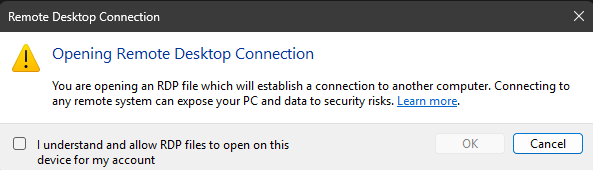
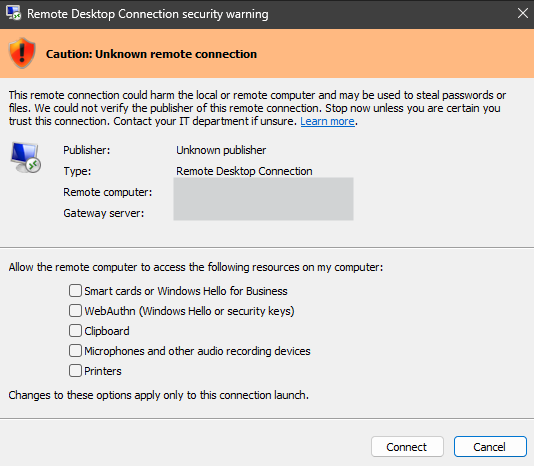
At first glance, that may sound like a minor interface change. In practice, it is a significant shift in how trust is handled for remote access. Microsoft has not removed digital signatures from signed .rdp files, and signatures still help verify who published the file and whether it has been altered. What has changed is the default behaviour at connection time: regardless of whether an .rdp file is signed or unsigned, every redirection it requests is now off by default, and the user must explicitly allow access to items such as clipboard, local drives, printers and other attached devices. The signature now determines which dialog banner the user sees, and whether a publisher name is shown, rather than granting automatic redirection trust.
Microsoft says the change is aimed at reducing phishing attacks that misuse Remote Desktop files. That matters because an .rdp file can do far more than simply open a remote session. Depending on its settings, it may request access to the user’s clipboard, mapped drives, smart cards, Windows Hello for Business credentials, microphones, cameras, USB devices, printers and other resources on the local machine. Microsoft’s own guidance warns that these pathways could be abused by an attacker to steal files and credentials from local drives, read copied content from the clipboard, capture audio or video, or interact with authentication devices and peripherals.
It is worth noting that the new behaviour only applies to connections started by opening an .rdp file. If a user types a computer name directly into the Remote Desktop Connection app, the experience is unchanged. That distinction matters for any SME whose users connect through ad-hoc manual sessions rather than distributed .rdp shortcuts.
For UK SMEs, the real issue is not just security but day-to-day usability. Many organisations have built dependable workflows around signed .rdp files distributed through internal portals, application launchers, RemoteApp environments or managed desktop estates. Users may now find that familiar shortcuts no longer behave as expected, especially where clipboard, drive or printer redirection has been part of normal working practice. In other words, the update is likely to reduce silent trust, but it may also increase support calls unless businesses communicate the change clearly.
From a managed cloud and private cloud provider’s perspective, Microsoft’s reasoning is understandable. A valid signature proves origin and integrity, but it does not guarantee that every requested redirection setting is appropriate for every user, device or situation. Microsoft has been moving in this direction more broadly: in Azure Virtual Desktop and Windows 365 guidance, it already recommends restricting device and clipboard redirection to reduce data exfiltration and malicious file transfer risks.
The good news is that organisations are not entirely without options. Microsoft has documented a temporary workaround for administrators who experience disruption: setting RedirectionWarningDialogVersion=1 (REG_DWORD) under HKLM\Software\Policies\Microsoft\Windows NT\Terminal Services\Client reverts the previous dialog behaviour. However, Microsoft also warns that support for this setting may be removed in a future Windows update, so it should be treated as a short-term bridge rather than a permanent fix.
For SMEs, the message is clear. This is not simply another background patch. It is a meaningful change to how Windows 11 handles remote trust and user consent. Businesses relying on signed .rdp files should review their current deployments, test their remote access journeys, decide which redirections are genuinely needed, and update user guidance before support desks feel the impact. For organisations using private cloud desktops or application hosting, this is a timely reminder that secure remote access is now as much about user experience and policy design as it is about infrastructure.
As a managed cloud provider, our view is that this is a sensible security step from Microsoft, but one that needs careful handling in live SME environments. The businesses that respond best will be the ones that treat it as both a security update and a change management exercise.
If you’re an SME who needs help with Microsoft Remote Desktop, give our friendly experts a call on 020 3327 0310.




