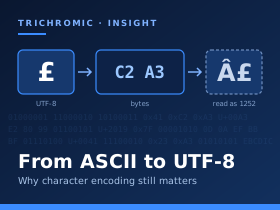
Every piece of text you see on a screen is stored and processed as numbers. Character encoding is the set of rules that allows software to turn those numbers into readable text. When systems follow the same rules, nobody notices. When they disagree, the results are familiar: “£250” on an invoice, a question mark replacing an accented letter in a client’s surname, or a CSV export that Excel turns into nonsense. Understanding how we got here makes these problems much easier to diagnose.
Where It Started: ASCII
The American Standard Code for Information Interchange, ASCII, was first published in 1963. It used seven bits, allowing 128 possible codes. The familiar version of ASCII contains 95 printable characters, including the space, alongside 33 control codes. Some of those controls remain part of everyday computing: carriage return and line feed are used in the different line-ending conventions associated with Windows, Linux and macOS. ASCII was designed around American English and had no pound sign. The British variant, BS 4730, put £ in the position occupied by #, creating an early opportunity for confusion when text moved between systems.
The Code Page Era
As eight-bit bytes became standard, another 128 values became available. Different character sets used those values for different purposes. The original IBM PC’s code page 437 included accented letters and box-drawing characters. ISO 8859-1, also called Latin-1, covered many Western European languages and placed £ at decimal value 163. Windows-1252 closely followed Latin-1 but used part of its range for additional printable characters, including curly quotation marks and, later, the euro symbol. IBM mainframes used another family of encodings, EBCDIC. Reading a file correctly depended on knowing its encoding, but plain text files rarely identified it.
The garbled text caused by interpreting bytes using the wrong encoding is called mojibake. In UTF-8, the pound sign is stored as two bytes. Interpret those bytes as Windows-1252 and they appear as “£”. A curly apostrophe can similarly become “’”. The original information may still be recoverable if it has simply been misinterpreted. However, if a conversion has replaced characters with question marks or discarded them, recovery may require the original file.
Unicode and UTF-8
Unicode set out to resolve these conflicting character sets by giving characters a shared numerical identity, called a code point. It now includes well over 150,000 characters, covering writing systems, symbols and emoji. Unicode and UTF-8 are closely related, but they are not interchangeable terms: Unicode defines the characters and their code points, while UTF-8 defines how those code points are represented as bytes. A single visible character can sometimes comprise several code points, particularly with combining accents and emoji sequences.
Developed by Ken Thompson and Rob Pike in 1992, UTF-8 uses between one and four bytes per code point. Its first 128 code points are encoded exactly as ASCII, so an ASCII text file is already valid UTF-8. This preserves compatibility with older text while keeping English compact. UTF-8 is now the dominant encoding on the web and is widely used for text files and data exchange.
Where It Still Catches People Out
Windows retains a mixture of Unicode interfaces and legacy code pages. Many Windows interfaces use UTF-16, while older software may still rely on the system’s “ANSI” code page. Windows PowerShell 5.1 illustrates the inconsistency: by default, Out-File and text redirection with > produce UTF-16LE, while Set-Content uses the system’s legacy code page when creating a file. PowerShell 7 defaults to UTF-8 without a byte order mark. The same script can therefore produce differently encoded files depending on which version runs it.
Excel has a similar trap. When opening a UTF-8 CSV directly, it can misinterpret the encoding if the file lacks a byte order mark—a short signature at the start that helps identify the encoding. That is how £ can become “£”. Importing through Data → From Text/CSV lets you select the correct encoding. When exporting, Excel’s CSV UTF-8 option provides a straightforward way to preserve international characters.
Databases have their own pitfalls. MySQL’s legacy three-byte UTF-8 character set, commonly encountered as utf8 or utf8mb3, cannot represent code points that require four UTF-8 bytes. This excludes many emoji and some characters used in writing systems. MySQL’s utf8mb4 supports the full Unicode range and is the appropriate choice for new applications. Database settings and application connections also need to agree about the encoding being used.
There is a security dimension too. Characters from different scripts can look identical or nearly identical: the Cyrillic “а” and Latin “a” are a familiar example. Attackers exploit these similarities in deceptive domains and email display names. Browsers apply checks that can cause some internationalised domains to appear in their ASCII Punycode form, beginning with “xn--”, although that prefix alone does not mean a domain is malicious. There is also a straightforward data-quality concern: a client’s name stored or printed incorrectly is an accuracy problem, not merely a cosmetic one.
Our View
As a managed server provider (MSP) and cloud service provider (CSP), we see encoding problems most often where systems meet: CSV exports, data transfers between business applications, legacy integrations and scripts moved between PowerShell versions. Our advice is simple: use UTF-8 wherever the receiving system supports it, and specify the encoding rather than relying on defaults. Make sure scripts, web pages, application connections and databases agree. When “” or “’” appears unexpectedly, investigate how the text has been decoded before assuming the original data is lost. More than sixty years after ASCII, the underlying question remains the same: does everyone in the chain agree on what the numbers mean?




