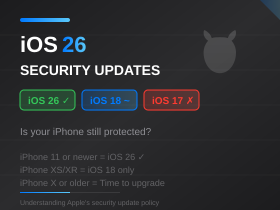
Understanding iOS Versions, Security Updates, and When to Upgrade.
(Updated: 15th August 2026)
If you’re confused about which iOS version your iPhone should be running, you’re not alone. Apple’s approach to software updates has become increasingly complex, and it’s not always obvious whether your device is still secure or when you need to think about upgrading.
This guide explains how Apple’s iOS versioning works, what security updates mean for your device, and how to know if your iPhone is still protected as we approach the next major software cycle.
The New Naming Convention: Why iOS Jumped to 26
If you were expecting iOS 19 after iOS 18, you might have been surprised when Apple released iOS 26 in September 2025. Apple changed their naming convention to align with the calendar year—so iOS 26 is for 2026, similar to how car manufacturers name their models.
This actually makes things simpler going forward: if the year is 2026, you should be running iOS 26 (if your device supports it). The year-based numbering makes it easier to identify Apple’s current generation of operating systems, although you still need to install the latest point release to remain fully up to date. For example, someone running iOS 26.0 in August 2026 isn’t current; they should be on iOS 26.6. Apple explicitly says keeping software up to date is one of the most important measures for maintaining security.
Major Updates vs Security Updates: What’s the Difference?
For most users, there are two main types of iOS updates to be aware of:
Major iOS Releases
These come once a year, typically in the autumn, and include new features, design changes, and performance improvements. Examples include the jump from iOS 18 to iOS 26. Major releases often drop support for older devices—if your iPhone can’t run the latest major version, you won’t get new features. Apple already previewed the upcoming iOS 27 at WWDC in June 2026, and it is slated for public release this autumn.
Minor and Security Updates
These are released throughout the year (e.g., iOS 26.1 through the current iOS 26.6) and focus on bug fixes and security patches. These are the updates that protect you from newly discovered vulnerabilities. Installing these promptly is essential for security.
The Current State of iOS Support (August 2026)
Here’s where things currently stand as we approach the iOS 27 launch:
iOS 26 — Current Stable Release
- Latest version: iOS 26.6
- Supports: iPhone 11 and newer and iPhone SE (2nd generation and newer)
- Status: Current stable version and receiving full security and feature updates.
- Recommendation: Install iOS 26.6 now. All iPhones capable of running iOS 26 are also listed by Apple as compatible with iOS 27.
iOS 18 — Older Devices Still Receiving Security Updates
- Latest version for older hardware: iOS 18.7.9
- Relevant devices: iPhone XS, XS Max and XR
- Status: Still receiving security updates, but these phones will not support iOS 27.
- Recommendation: They are not immediately unsupported, but businesses should begin planning replacements because they are now permanently on an older OS branch.
iOS 16 and iOS 15 — Legacy Security Support
Apple is still occasionally issuing security updates for older iPhones. iOS 16.7.16 was released for the iPhone 8, 8 Plus and X in May 2026, while iOS 15.8.8 was released for devices including the iPhone 6s and iPhone 7 on the same date.
However, these releases should be regarded as legacy security maintenance rather than full support. Apple warns that previous operating-system versions may not receive fixes for every known security vulnerability. For business use or other security-sensitive applications, replacement of devices limited to iOS 15 or 16 is therefore sensible.
Which iPhones Support Which iOS Version?
Here’s a quick reference for which devices can run which iOS version:
iOS 26 and the upcoming iOS 27 (fully supported):
- iPhone 11 series, iPhone 12 series, iPhone 13 series, iPhone 14 series, iPhone 15 series, iPhone 16 series, iPhone 17 series, iPhone Air, and iPhone SE (2nd generation and later)
iOS 18 (security maintenance, will not support iOS 27):
- iPhone XS, XS Max, XR
iOS 16 and iOS 15 (legacy security maintenance):
- iPhone X, 8, 8 Plus (capped at iOS 16)
- iPhone 7, 7 Plus, 6s, 6s Plus, SE (1st gen) (capped at iOS 15)
Why This Matters for Security
Security vulnerabilities in iOS are discovered regularly. When Apple releases a security update, they also publish details of the vulnerabilities they’ve fixed. This means that once an update is released, attackers know exactly what weaknesses exist in unpatched devices.
If your device isn’t receiving security updates, known vulnerabilities remain unpatched. This is particularly concerning for devices used to access business email, banking apps, or any sensitive information. Apple’s security updates often address vulnerabilities that are already being actively exploited—meaning attackers are using them in the real world. Running an unsupported or legacy iOS version is a genuine security risk.
What About App Compatibility?
Beyond security, older iOS versions increasingly struggle with app compatibility. App developers eventually stop supporting older iOS versions, which means apps may stop working, fail to update, or refuse to install altogether.
Banking and financial apps may stop supporting older iOS versions sooner than many other apps because of their security requirements. If your banking app stops working, it’s a strong signal that your device is too old to use safely.
Business Considerations
If you use your iPhone for work—accessing company email, storing client contacts, or using business apps—security updates aren’t optional. An unsecured device connecting to business systems creates risk for your entire organisation.
Many businesses now require devices to be running a supported operating system version as part of their security policies. Mobile Device Management (MDM) systems can enforce this automatically, blocking access from devices running outdated software. If you’re responsible for company devices, now is a good time to audit what iOS versions your fleet is running and plan replacements for any devices that can no longer be comprehensively updated, especially before the iOS 27 rollout this autumn.
How to Check Your iOS Version
To see which iOS version you’re running, go to Settings > General > About and look for the iOS Version number.
To check for updates, go to Settings > General > Software Update. If no update is available, your phone may already be running the newest version available for that model. However, if it is limited to an older iOS generation such as iOS 15 or 16, it is receiving legacy security maintenance rather than the comprehensive protection available on the current version of iOS.
Our Recommendations
- If your iPhone supports iOS 26: Update to the latest iOS 26 version (currently 26.6) and keep it updated. Look forward to iOS 27 this autumn, as your device will support it.
- If you have an iPhone XS, XS Max, or XR: Stay on the latest iOS 18 version (currently 18.7.9). Since these devices will not support iOS 27, you are now permanently on an older OS branch. Start planning for a replacement to ensure ongoing comprehensive security.
- If you have an iPhone X, 8, 8 Plus, 7, 7 Plus, 6s, 6s Plus or SE (1st generation): Replace the device as soon as practical. While Apple still occasionally releases legacy security patches (such as the May 2026 updates), these may not address all known security issues, making them unsuitable for business or security-sensitive use.
- If you have an even older iPhone: Replacement should be considered a priority, particularly if the device is used for email, banking or other sensitive information.
Remember: your phone doesn’t stop working when it stops receiving major updates. It still makes calls, sends messages, and runs apps. But it becomes increasingly vulnerable to attack, and eventually apps will stop working. The question isn’t whether your old iPhone still works—it’s whether it’s still safe.




