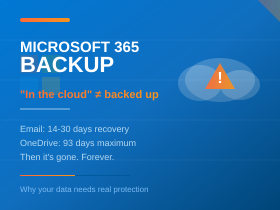
Microsoft 365 includes useful protection for business email and files. Deleted messages can often be recovered, and Microsoft’s infrastructure is built to keep services available. Recovery has limits, though. What you can get back depends on what happened, how quickly it is noticed, and what protection was configured beforehand.
What Microsoft already protects
Microsoft keeps multiple copies of Exchange Online mailbox databases across its data centres to protect against hardware and site failures. This resilience keeps the service running, but it is not a historical backup. The standard service offers no way to roll a mailbox back to a chosen date.
How long deleted email can be recovered
Emails in Deleted Items can be moved back until the folder is emptied, either by the user or by an automatic policy. Once emptied, or if messages were removed with Shift+Delete, they normally stay in Recoverable Items for 14 days, and an administrator can extend this to 30. Single Item Recovery is enabled by default for new mailboxes, so an administrator can usually still retrieve messages a user has purged, within the same window. That window starts when a message enters Recoverable Items, not when it was received. Five years of email deleted yesterday may therefore still be recoverable today, but not next month.
Deleting a user account normally leaves 30 days to restore the mailbox. Removing an Exchange Online licence usually allows a similar 30-day period to reassign it. After that, the data is deleted, and some explicit permanent-deletion actions can remove recovery options sooner.
Retention policies help, but only if set up in advance
Microsoft Purview retention policies and holds can preserve email for years, depending on licensing. A hold applied before an employee’s account is deleted can keep their email in an inactive mailbox. However, holding a licence that supports retention does not mean a suitable policy is in place, and a policy applied after data has been purged cannot bring it back. Retention also preserves information for searching and export, which is not the same as restoring a working mailbox after extensive deletion.
Where the real risk lies
The biggest gap is usually the time between losing information and discovering it is needed. A project’s correspondence might be deleted and only missed months later. A leaver’s mailbox might be removed before anyone checks what it holds. An attacker with access to an account may delete messages deliberately. A plan should answer practical questions: what is covered, how far back recovery goes, and how quickly staff can get back to work.
Why we recommend Hornetsecurity Plan 3
Microsoft offers its own Microsoft 365 Backup as a separately charged, opt-in service covering Exchange Online, OneDrive and SharePoint. Hornetsecurity 365 Total Protection Plan 3 goes further. It backs up Exchange Online mailboxes (including archives), OneDrive, SharePoint, Teams chats, Planner and OneNote automatically to Hornetsecurity’s own infrastructure, independent of Microsoft. Storage is unlimited, retention periods are configurable, and individual emails and files can be found and restored, with users able to recover some of their own data.
Plan 3 also includes spam and malware filtering, advanced threat protection with attachment sandboxing and URL rewriting, email encryption, and centrally managed signatures and disclaimers. It adds email archiving, which keeps a searchable record of correspondence, a different job from backup. Its continuity service provides webmail access so staff can keep sending and receiving email if Microsoft’s service is unavailable.
Our view
As a managed cloud provider supporting regulated professional services firms, we see Microsoft 365’s native recovery as a safety net rather than a backup strategy. It works well when problems are spotted quickly, but it offers little protection against the loss nobody notices for months, which is often the one that matters most to firms with record-keeping obligations. We recommend Hornetsecurity Plan 3 because it closes that gap and strengthens email security in the same package. If you are unsure whether you could recover an email deleted six months ago, call Trichromic on 020 3327 0310 for a no-obligation review of your Microsoft 365 protection.




